P2 is one of my all time favourite themes – not only because it transforms WordPress into something completely different, but also because it’s an innovative way we communicate internally here at WP Hosting. If you don’t know P2 yet, do check it out at p2theme.com and watch the video.
At the time of writing P2 is at Version 1.3.3 and has been since November last year. Code changes quickly, so by the time you’re reading this my ramblings may be out of date.
Let’s have a look at how we can add and amend the default categories (i.e. Status Update, Blog Post, Quote and Link).
Changing the Labels
We’ll start by looking at how to change the labels at the top here:
P2 default categories - these are hard coded in Version 1.3.3
Take a look at a file called post-form.php in the root of the P2 directory. In it you’ll find this cryptic block of code:
This is an unordered list which displays the tabs, let’s call it the Post Menu for reference.
Notice how each item gets referred to a number of times here. The last two items in each line (for example ‘Status Update’) are the ID and displayed text. If all you want to do is change those labels, then go ahead and replace them with anything you like:
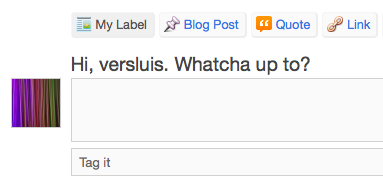
Status Update now reads My Label - but it stills posts into 'status'
If you post something with your new option highlighted, it will still be posted in the “status” category. The same goes for all four options – you can change the label with this option, but not the actual post category.
Adding new Categories
You’ll probably want to add your own category buttons, or perhaps change the existing categories to something else.
If you just go ahead and tweak the existing values, you’ll notice that P2 ignores your changes and posts everything in “status”. Let me assure you: you’re not mad, it’s just how P2 rolls:
The reason for this is that there’s an array defined somewhere and the theme checks if you’re posting in any of those “valid” categories. Thanks to Nobble for mentioning this over a year ago on the WordPress Forum.
Let’s take a look at ajax.php (it’s in a sub-folder called inc). Halfway down the file we’ll see the array being defined:
Wonderful! Notice that this will now create a new category or post in the existing one. Exactly what we want!
But how do we add our own items to the Post Menu? Let’s find out next.
Adding new items (categories) to the P2 Post Menu
Going back to the Post Menu on the last page, you can easily replace, remove or add items to the unordered list. I’m adding one called “Testing” here – so the entire block of code would look like this:
Now that we’ve got a new addition to the family, we want it to look a bit different than the other ones. In my case, I’d like to change the font to bold and red. Here’s what it looks like at the moment:
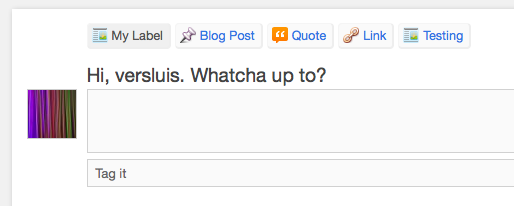
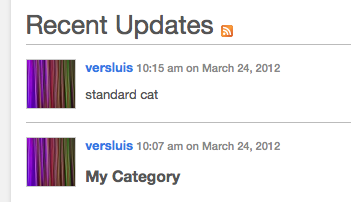
All posts look the same. I want mine to "pop" though - let's make them bold and a bit bigger.
We’ll do this with a bit of CSS jiggery pokery, so let’s head over to the style.css file and add these lines to the bottom:
Note that I have to use the !important statement here so that my changes show up – I never know when to use it, but if you *think* your tweaks should be working and they don’t it’s a good Swiss Army Knife to try. In this case, it’s a must.
And voila – we’ve got a different styling for our category:
Bigger and Fatter styled category (I didn't use red in this screen shot)
Play with those values to your heart’s content, add colour, add anything. Have fun.
Next we’ll have a look at the styling for Quotes and add a highlight to the Post Menu.
Styling P2 Quotes
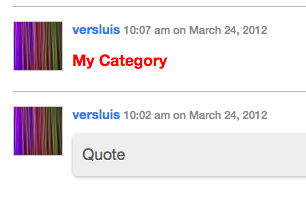
I really like the grey box when you add a quote, it gives a nice plain highlight which almost adds a 3D effect:
Standard "Quote" Formatting in grey
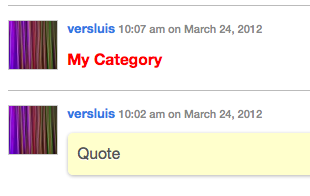
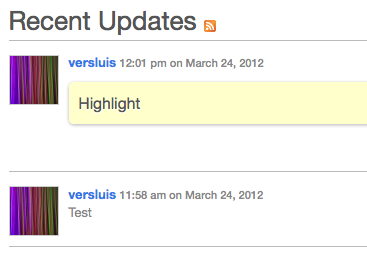
I want mine to be more like a Stabilo Boss Highlighter effect, so let’s add some CSS magic in style.css for this:
.category-quote blockquote p {background-color: #ffc;}
... and in yellow
Styling the Post Label and Icon
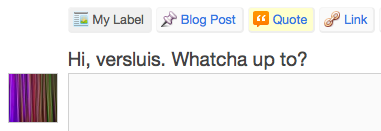
Maye I’d like to show my visitors what happens when they click the “Quote” button, so I’m applying the same yellow highlighter effect to the actual button at the top.
Remember how we added ID’s to each of those labels at the beginning? This is where these come in handy – because now you can target each label individually like so:
#post-types #quote {background-color: #ffc;}
Here’s the result:
The Quotes Label is now highlighted (highlit?)
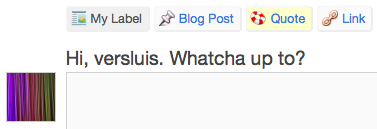
Shall we also change the little icon in the label? Let’s do that next. All we need is a 16x16px icon with transparency (i.e. a PNG file), somehere accessible and add it to the above statement like so:
Wondering where all the standard P2 icons come from? They’re actually all saved as one long PNG file in /i/post-types.png. So for every post type the same image is called, but the background-position is moved left or right. That’s why I need to reset this property here, otherwise my own icon won’t show up.
Here’s what my label now looks like:
My own icon next to Quotes. Nice!
Since I like the Quotes so much (but will never use them for my project) I’ll show you how to get rid of the necessity to give a Quote Author next.
Deleting the Quotes Author Field
I like my quotes styling so far, but actually I don’t want to use them as quotes at all. What I’m really interested in is to just be able to click a “highlight” button and not have to fill in the quote author field.
By default, if I don’t do this, then P2 will post my Quote as a standard Status Update. Let’s fix this.
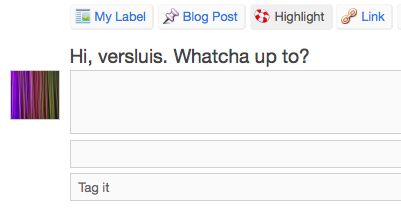
I’m also going to relabel my Quotes field to Highlight so it makes more sense (I”m leaving the ID and category as “quote” for this example though):
That field above "Tag it" is for the quote author
To remove the field, we’ll suppress its output via CSS so we don’t have to hack anything that could break things:
#postcitation {display: none;}
Now we need to tell P2 that even if there’s no quote author we’d still like to post in our category rather than “status”. Here’s the code we need to change:
/* Add the quote citation to the content if it exists */
if ( !empty( $_POST['post_citation'] ) && 'quote' == $post_cat->slug ) {
$post_content = '
' . $post_content . '
' . $_POST['post_citation'] . '';
}
Let’s remove the clause that’s asking “if post citation is not empty” and leave everything else untouched:
if ( 'quote' == $post_cat->slug ) {
$post_content = '
' . $post_content . '
' . $_POST['post_citation'] . '';
}
Our problem appears solved, however we still have a slight styling issue to take care of. Here’s what our “Highlight” posts look like right now:
There's a gap underneath our highlights...
That’s where the author is inserted prefaced by ‘–‘ but we don’t want either of it. CSS to the rescue again:
.category-quote blockquote cite {display: none;}
In Summary
There’s still work to be done to tweak the theme to your needs, but I hope I could steer you (and me for that matter) on the right path here. P2 is such a cool theme, and in a way it’s just “right” the way it is out of the box.
Sure it would be nice if we had more features here and there (like easy to label categories or perhaps more mobile clients other than just the iPhone) but the principle works – and works extremely well. I can’t wait for the next version of P2 and see where else this theme can take WordPress.
Comments are always welcome, but please keep the in-depth questions on how to do things not covered here to the P2 Forum.

 Today I’m going to tweak the marvellous P2 Theme by Automattic.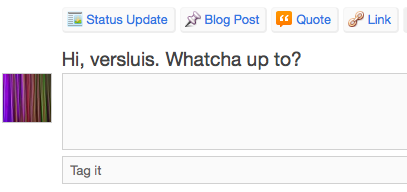
Always good to hear – thank you, Fab!