Hi, I’m Jay Versluis!
On this site I take notes about how to do things with computers. I like technology, but only when it works. I do a bit of coding sometimes, but I tend to forget how stuff works in detail so I write it down while it’s in my head, or explain it to my future self. So it’s a notebook about coding, gaming, system administration and web services.
I also make videos about software on a variety of other subjects, from quick tips to full courses. Take a look at the top menu for an overview.
I like 3D development too, but I have another website for that.


Latest Video
Here's my latest YouTube video, brought to you by some magic I found here.
You can find many other videos either on my dedicated Watch Page, or from the drop down menu at the top. They're grouped into playlists to aide discoverability.
If you're a supporter, you get to watch most videos without ads! You'll need to register here, and if I can link your name or email to a recent donation, you'll be able to login on this site and all those pesky ads shall disappear.
Take a look at how to support me here ;-)
Current Projects

I'm currently working full time on a feature-length 3D animation project called Heart of Mercy for St. Luke Productions, starring Jonathan Roumie and Maria Vargo.
In my spare time I'm tinkering with a tech demo in Unreal Engine using Story Framework and Narrative. I write more about these things and related discoveries on my other website.
Recent Articles

This is what I've been writing about lately. You can read more articles either on my Blog Feed, or take a look at the top menu for a full table of contents. There's a list of posts filtered by topic, or if you're looking for anything in particular, use the search function in the menu.
- FIXED: Playstation Remote App for Windows crashes after 30 seconds
- How to switch between multiple monitors in NoMachine
- FIXED: How to upgrade from macOS High Sierra to Mojave despite “could not reach recovery server”
- How to run Faceform Wrap on Linux
- How to convert characters from lower case to upper case in Commodore Basic
- How to print inverse characters in Commodore Basic
- FIXED: Mac Mini Intel refuses to load Boot Manager (USB or internal drive)
- How to check your DNF History in Fedora
- Getting Started with WSL in Windows 11
- How to play Secret Files: Tunguska in 4:3 on Windows 11
Discover more

Unearth over ten years worth of content with this handy Tag Cloud. Click you like and browse through the archives of a whole keyword. If you want to drill deeper, take a look at the search function at the top.
Announcements (9) Bookmarks (18) Child Theme Wizard (4) Coding (13) Commodore (46) Commodore Podcast (16) Gaming (66) How To (120) iOS (222) Linux (153) macOS (82) MySQL (20) PHP (32) Plesk (78) Plugins (22) Podcast (43) Python (1) Reviews (34) Screencast (107) Show Me The Cookies (1) Streaming (21) Tech (7) Themes (32) Uncategorized (3) Visual Studio Code (3) Windows (85) WordPress (185) WordPress Podcast (14) Zen Dash (5)
Amazon AWS Apache Apple Audio BASIC C64 C128 CentOS Core Data CSS Discord Dreamweaver Email Fedora Firefox FTP Git GNOME How To iOS JetPack macOS NC 10 Networking NSDate NSString OBS P2 Parallels Desktop PHP Playstation Plus/4 Snapshot Backup Devlog Steam Themes tutorial TwentyThirteen Twitch UINavigationController UITableView UITableViewCell Xcode Yosemite YouTube yum
Who am I?
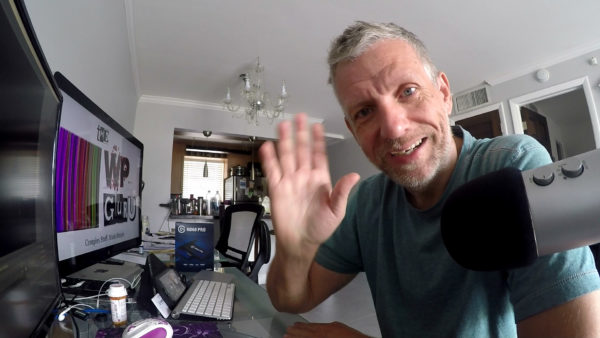
I'm a broadcast professional by trade, with a background in film and video engineering. I've had various jobs in film and live television for 20 years, ranging from telecine colourist to editor, tape jockey and satellite feed coordinator. I'm essentially "the guy who makes things happen".
Reputable clients included the BBC, MTV, IMG, CNN, Cartoon Network, Reuters, NHK and various other outfits that probably no longer exist. I'm originally from Germany, but lived and worked a lot in the UK before moving to Miami Beach, thanks to winning a Green Card.
On the side, I've been a content creator since the early days of the internet, long before this was a "thing". Over time I found myself running several websites and YouTube channels, dealing with web servers, and helping people get started with WordPress, 3D software or live streaming. I enjoy collaborating on creative projects around 3D art, writing and video games.
In 2016 I nearly died from a complicated case of colon cancer. Thanks to immunotherapy I made a truly miraculous recovery. My doctors call me a Super Survivor. In fact, my case and my story were so impressive that I've written a book about it.
After having being a 3D hobbyist for many years, I now work as 3D technical artist, animator and occasional instructor. I use Unreal Engine, Blender, Daz Studio, Substance Painter, Marvelous Designer and other 3D apps.
Let's keep in touch!
I do a lot of things across a variety of sites and services. If you'd like to keep an eye on what I'm doing in a unified place, take a look at my Twitter or Bluesky feeds. I post new videos and articles there, no matter where they end up.
You can also subscribe to YouTube and Twitch notifications (that overused bell icon), or sign up to receive new articles from this site via email if you like:
I also offer some behind-the-scenes progress reports, early access and plans for upcoming things on Ko-fi and Patreon. If you want to say thanks or buy me a coffee, those places are perfect! You can support my work in various other ways too if you like.
I no longer maintain a public email or contact form. The spam just got too much. If you want to get in touch, DM me on any of the social networks or leave a comment (preferable on topic).
If you want to hire me for a project or consultation, you can do that too!