

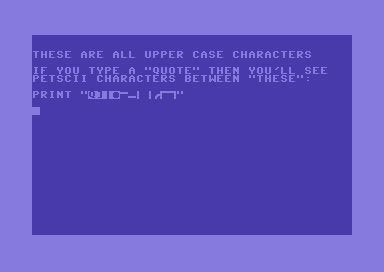
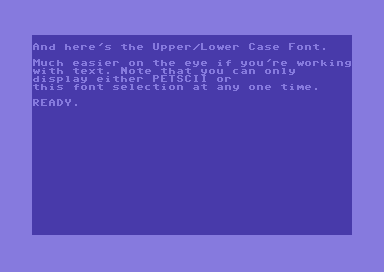
The C64 can display two sets of fonts: either a combination of upper case and lower case letters (good for any kind of text), or a combination of upper case letters and graphics (default), known as PETSCII characters.
On a Real Device
In direct mode you can switch between the two by pressing CBM+SHIFT (i.e. The Commodore Key and SHIFT together).
But that’s no good when you’re app starts – you can’t expect the user to press that combination to see the correct letters on the screen (or that horrible combination of text and weird characters). The good news is that you can switch between those fonts in code too:
POKE 53272,23 :REM LOWER/UPPER CASE MODE
POKE 53272,21 :REM UPPER CASE/PETSCII MODE
While your app is running users would still be able to use the CBM+SHIFT combination to switch the fonts – which is ugly to say the least. But we can manually disable and enable this for users:
PRINT CHR$(8) :REM DISABLE SWITCH
PRINT CHR$(9) :REM ENABLE SWITCH
Here are a couple of examples of what this looks like:
In VICE
If you’re on VICE, the above will work of course, but when you’re typing away you might be wondering how to achieve this. Turns out SHIFT+TAB will do it!
Note that if you’re using the 80 column display on the virtual C128, the letters currently on screen won’t change appearance. That’s because the VDC chip works differently, so there’s no immediate feedback that it’s worked. Subsequently typed letters will reveal the change.
The “Commodore 64 Programmer’s Reference” explains all this and more. I wish I knew this book existed back in the eighties! You can still grab a copy from Ian’s amazing site commodore.ca (in the Manuals section):