
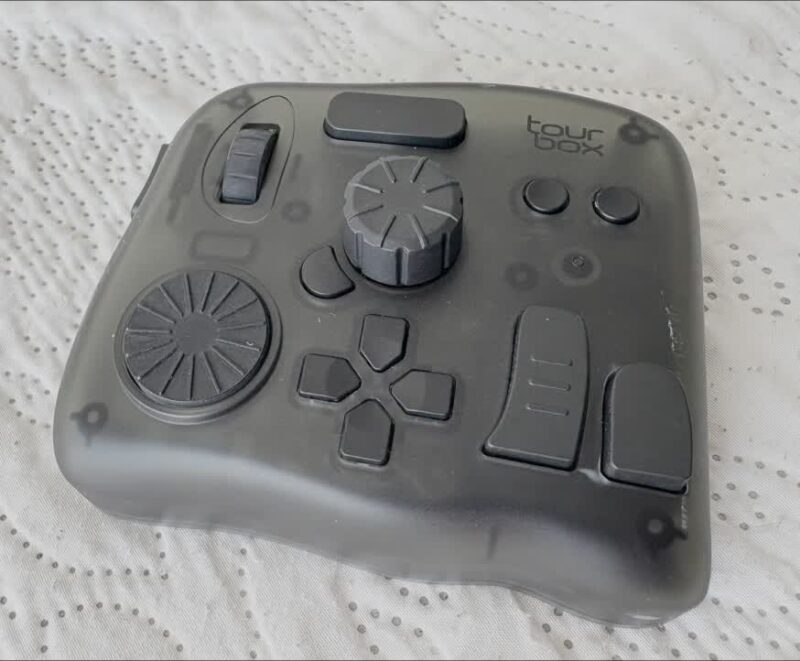
I’ve splashed out on a Tourbox Elite in translucent black for just under $300 back in 2024. This was literally 50 days before their “new and improved” version came out that supported the iPad. Naturally I wasn’t allowed an exchange because they’re such a “nice” company. This review has been sitting in here as a draft, half finished until now in August 2026, when I finally understood why this thing was never working for me as much as I had hoped it would.
If you’ve heard of this thing, looked right through the fake reviews of “how it’s changed everyone’s creative life” and want to hear from a user you didn’t like it, this article is for you.
The Elite came with a nice case and a braided angled USB-C cable (that I may actually use for something else because the device connects via Bluetooth). I have long been a fan of external specialised controllers and from the raving reviews and features I read, Tourbox seemed to tick all the boxes for what I wanted.
Truth be told, if you disregard all the fanboy reviews from people who got a device for free, there’s very little bad press this little gadget gets from what appear to be actual users. Could be that I’m the only one, but I can’t jump on the raving hype train here: while yes indeed it works, and it works well, it’s not the killer tool and productivity multiplier I had hoped it would be.
Let me tell you about my experience, perhaps it helps let you make a decision.
What I wanted to do with Tourbox
I like the idea of specialised input controllers. I’m a die hard game controller player on both PC and console, I have several versions of the Stream Deck, and I’ve even bought a TabMate controller just for a single application (Clip Studio Paint). They all add something special to the mix, although the TabMate is limited to a single application that I don’t use all that often. I’ve recently bought a DaVinci Speed Controller for use with another single application, and I’ll talk more about how it compares to the Tourbox below.
Essentially I wanted something to quickly rotate the canvas in Photoshop with a dial, or something that could also speed up my video editing, as well as something that could quickly switch modelling tools and sculpting brushes in Blender and ZBrush, perhaps even help with adjusting values and foliage settings in Unreal Engine. I wanted to utilise controls that aren’t native to my desk. It’s a big ask, but from the buttons and versatility of the Tourbox Console, this thing would tick all those boxes.
And yes sure, everything is programmable and the little guy can be turned into just that for all these apps and more. What I didn’t anticipate however is that I’m so used to using my keyboard shortcuts that it feels almost alien to press different buttons for the same thing, and having to learn them at the same time. Tourbox actually makes me way slower at doing jobs than just using the versatile, ubiquitous and much cheaper keyboard.
Tourbox in Photoshop
I do texture retouching in Photoshop using an XP Pen Artist Pro screen. To make accurate brush strokes, I tend to rotate the canvas a LOT, switching back to a full screen reset, and a 200% zoom. Those are traditionally
- R + mouse drag (rotate)
- ESC (reset canvas)
- CTRL + 1 (Zoom 100 or 200%)
- CTRL + 0 (fill screen)
I also use the square brackets to adjust the brush size, but once set I usually don’t touch this again. Mapping all these things on the Tourbox was fun, but awkward to operate at first. While I did get into it, it didn’t make me more productive or faster at what I was doing. Quite the opposite: I kept discovering things that I needed the keyboard for, so I kept reverting back to using my regular shortcut keys without missing the Tourbox.
Sure with practice it might turn the other way round, but will it? Is that worth the learning curve? What else would I have to invent to make this thing earn its keep? I heard stories of less finger strain and all that, but I really can’t see that being a thing for my own workflow.
Tourbox in Premiere Pro
I briefly tried Tourbox to edit a video in Premiere. I do a lot of those, and I use a few very specific functions with it:
- Q and W to top and tail footage that’s already on the timeline
- switch between the V (selection tool) and the C (cut tool) to make edits
- CTRL+D to apply a default transition
- occasionally drag in a transition from the menu
- play at 2x or 3x speed (L x2)
- play and stop (SPACE)
The defaults for Premiere have two options on Tourbox: editing and colour correction. Those are two very different disciplines, so I gave editing a go. The large scroll wheel is fun to jog footage with, but it’s so abysmally slow that it’s not great for 60fps footage. I’m sure it can be adjusted, but it’s not something I tried.
None of the keys I used were mapped, so I had to remap all of them to be useful. I discovered the play fast option is a multi-key press, but since I usually do it with my right hand (J K and L being right there under my fingertips), it felt odd to do it with my left.
All in all I felt that the variety of operations I perform basically in my sleep were so much faster to accomplish with default keyboard shortcuts and mouse movements. Tourbox didn’t add any magic to the party at all, not for me. It felt more like an alien device that promised much more than it actually delivered.
I do want to keep at it though, even if it’s just for specialised operations like
- mark this clip, split the audio from it
- adjust speed to 500%
- cut the underlying audio to length
- then ripple delete
If that could become one key, it’ll be a nice time saver – albeit one I don’t need a $300 device for. I cannot see Tourbox ever becoming the “only thing I use for editing aside from a mouse”. Literally never.
3D Apps
This section originally said “to be continued”, and here’s the honest truth: it never was. A year on, I still haven’t set up the Tourbox for Blender, ZBrush or Unreal Engine. That’s not laziness – it’s the review writing itself. A tool that genuinely multiplies productivity gets integrated whether you plan to or not. This one sat on my desk in its lovely translucent black, waiting for me to do the work of making it useful.
It’s still waiting.
A year later: the penny drops
It took another purchase to understand why the Tourbox never clicked. In 2026 I bought DaVinci Resolve Studio bundled with the Speed Editor panel – about $475 for both, so the panel effectively cost half of what the Tourbox did. Within five minutes of wiring it up, editing felt like second nature. I was leaning back in my chair, coffee in hand, picking footage with a jog dial that feels like a proper Sony DVW-500 broadcast deck. I was blown away – and it finally crystallised what the Tourbox had been missing all along.
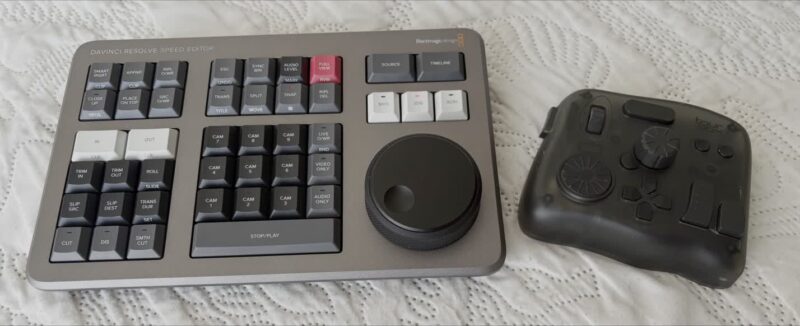
The Tourbox is app-agnostic. “Map anything to anything” sounds like flexibility, but it’s actually homework. Every button is blank until you decide what it means, which means you’re designing an interface, then building muscle memory for your own design – with no labels to help you. You’re re-learning while also inventing the workflow. And because every function is just a relocated keyboard shortcut, nothing on it is ever faster than the shortcut it duplicates. The device says “anything goes”, but it doesn’t meet you even halfway in figuring out what that anything should be.
The Speed Editor is the exact opposite. Every key is fixed, labelled, and exists because someone at Blackmagic decided this is how editing should work. You don’t configure it – it configures you. Nobody ever remapped a Betacam deck, and that constraint turns out to be the feature. Add the one thing a keyboard genuinely cannot replicate – a weighted, continuous, analogue dial for scrubbing through time – and you have a device that teaches you a better workflow instead of waiting for you to invent one.
Verdict
The Tourbox isn’t bad hardware. The build quality is genuinely nice, the knobs and buttons feel great, and the software works as advertised. But it’s philosophically hollow: a box of unlabelled potential that puts all the design work on you. If your workflow revolves around continuous parameters – brush size and opacity in Photoshop, sliders in Lightroom, maybe a volume knob in OBS – its knobs map naturally to those, and it may yet earn its desk space. Mine might still find that niche one day.
Add to that the fanboy marketing you can’t really trust, and a caveat that bit me to make my experience extra sour: a new version arriving that supports the iPad, exactly 50 days after my purchase. Of course the company didn’t offer an upgrade to that, nor saw it fit to make whatever change had to be made in software. So yeah, a hard sale indeed, and a company I cannot recommend (did reach out to them, but they didn’t want to know, and they’ll never get another sale from me).
Fact is, if you’re hoping a programmable controller will make you faster at things you already do quickly with keyboard shortcuts, save your $300. What makes a control surface worth having isn’t that it can do anything – it’s that it was built by someone with an opinion about what you should do with it.
It took the Speed Editor to teach me that, and it cost less.