
We do so much in browsers these days, and it’s super easy to get lost with so many tabs open. Despite the best organisational options modern browsers offer us, I prefer a stand-alone app for certain things. Notion is a good example: I really need for it to be a completely separate item so I can ALT-TAB between other apps and compare if I’m on track. Sadly though, not every web service has an installable app.
Thankfully, the Chromium browser has an option to let us create something like that, complete with icon and login credentials. Let’s take a look at how to do this.
Install Chromium or Chrome
Either Chromium (or by extension all browsers derived from it, like Google Chrome) have a feature at the top right (three-dots icon) that comes up under “Cast, save and share”, called “install page as app”. This option only comes up if the web site is installable, so not all sites support it. Many do (like this very site can you believe it!).
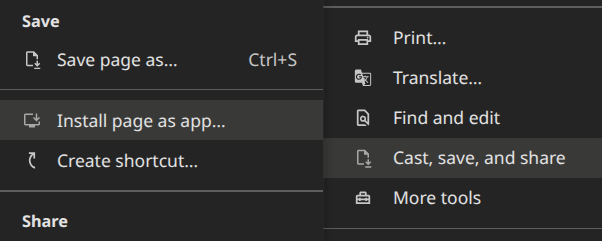
When you click it, a new stand-alone window is created, into which the current tab is split off to. It’ll store the session and that you’re logged in, so it’s just like using it in a web browser (minus title bar, bookmarks and all the other clutter we likely won’t need at this point).
Even if Chrome(ium) isn’t your daily browser, if you’re interested in this functionality, you’ll have to install either of them. Chromium is the open source project without Google-specific features, while Chrome is Google’s version of the same app with added features.
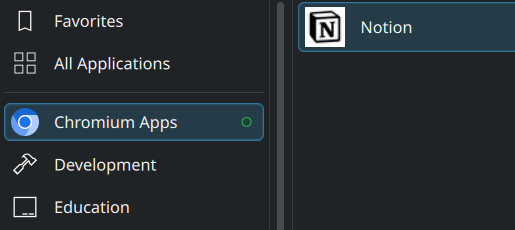
On KDE Plasma we get the added benefit of an App Icon that can be used in the Start Menu. It’ll also appear on your Desktop, so you can launch your new app from either even after a restart. It behaves like the app you’ve always wanted, without an installer or the need for updates (as new data gets pulled from the server, and your OS takes care of the Chromium updates).
That’s it! Enjoy Notion and Co as apps. This principle probably works on other operating systems, but I’ve not tested it under Windows or macOS, where stand-alone installers are often available. Us Linux users re used to hand-rolling and we’re not afraid of it 😄