
I have an exFAT partition on a dual-boot MacBook so both operating system can share data. macOS mounts it by default, but of course Linux would never be that practical. In KDE Plasma’s Dolphin I can click the unmounted partiton and the drive becomes available, but it means an additional step for me I’d like to avoid. I’d also like to avoid hand-editing /etc/fstab, and thankfully there’s a tool for that:
The KDE Partition Manager
Let’s start it (admin password required) and use it on my not-yet-mounted (or freshly unmounted) partition. Right-click the partition you want to auto-mount and choose Edit Mount Point.
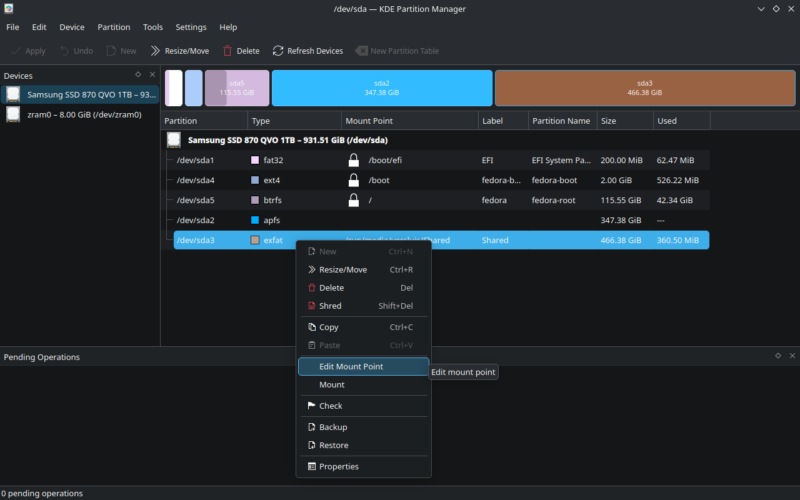
This will prompt us for a location. Fedora Desktop default if we were to do this manually with Dolphin would be /run/media/you/something so I’ll follow that convention and call mine Shared (same label I’ve given it in macOS).
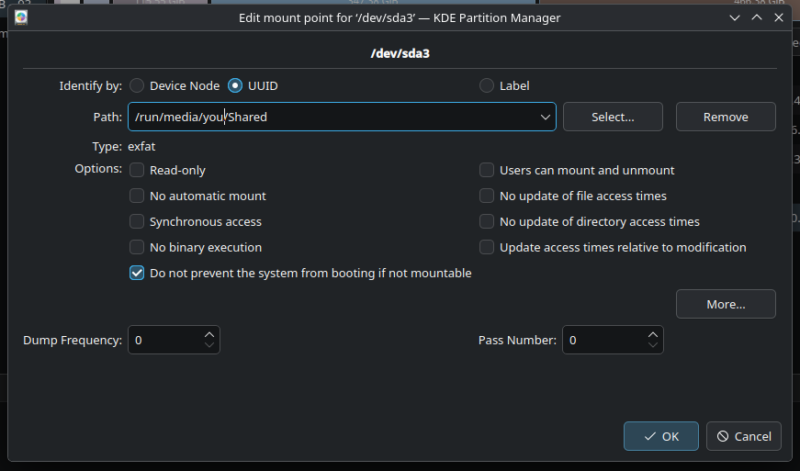
If this were a Linux filesystem that understood permissions, it would “just work” on the next reboot. However it is not, which means that if we did nothing else, all files on this mount would be owned by root and that’ll be problematic every time we want to write something.
Thankfully there’s a way around this: click MORE in the dialogue above and add the following two lines. This will give permissions to the current user instead, which is likely what we want.
uid=1000
gid=1000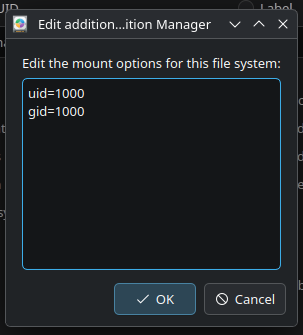
We can now mount the partition directly inside Partition Manager, or wait for the next reboot and see this magic happen by itself.