
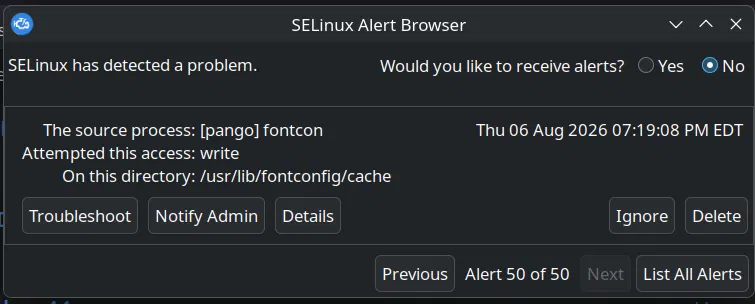
For the last few days Fedora kept greeting me with an avalanche of SELinux Alert Browser popups – fifty of them, then a hundred, seemingly every time I so much as looked at the machine. This was on my HP Z840 workstation. Each one told the same story: a process called [pango] fontcon attempted write access on the directory /usr/lib/fontconfig/cache, and SELinux said no. Nothing was visibly broken, which somehow made it more annoying rather than less.
Here’s what’s actually going on, and the one-liner that fixes it for good.
What’s actually happening
Every GUI application that renders text goes through fontconfig, which maintains a cache of all installed fonts so apps don’t have to re-scan them at every launch. The system-wide copy of that cache lives in /usr/lib/fontconfig/cache, and it belongs to root.
When that cache is stale or missing – typically after a distro upgrade or an interrupted font package transaction – every application you launch notices and helpfully tries to regenerate it. The trouble is, your apps run as you, not as root, and SELinux quite rightly refuses to let a random confined process scribble into /usr/lib. The result is one denial per application per font, which is how you end up with an alert browser showing “Alert 50 of 50” from doing nothing more exotic than opening a file manager.
The reason nothing visibly breaks is that fontconfig quietly falls back to a per-user cache in ~/.cache/fontconfig. Your fonts render fine; SELinux just keeps a meticulous diary of every failed attempt to fix the system cache.
The fix
Rather than muting the messenger, we fix the underlying condition: rebuild the system-wide cache once, as root, so no application ever needs to write there again.
sudo fc-cache -fsvThe flags: -f forces a rebuild even if caches look up to date, -s restricts the operation to system-wide directories (exactly the part your user account can’t touch), and -v shows you what’s happening. While we’re at it, let’s make sure the SELinux labels on that directory are sane:
sudo restorecon -RFv /usr/lib/fontconfig/cacheOn my system, that second command produced something interesting:
Relabeled /usr/lib/fontconfig/cache/3830d5c3...cache-9
  from unconfined_u:object_r:fonts_cache_t:s0
  to   system_u:object_r:fonts_cache_t:s0
Relabeled /usr/lib/fontconfig/cache/6fcb01a0...cache-9
  from unconfined_u:object_r:fonts_cache_t:s0
  to   system_u:object_r:fonts_cache_t:s0
(... and so on for each cache file ...)
Note what changed and what didn’t. The type – the middle part, fonts_cache_t – was already correct, and that’s the field SELinux’s targeted policy actually enforces on. What got corrected was only the SELinux user field, from unconfined_u to system_u. The amusing wrinkle: that unconfined_u came from the fc-cache command we ran seconds earlier. sudo gives you root’s Linux privileges but keeps your unconfined SELinux user context, so the freshly rebuilt cache files carried my identity rather than the system’s. Harmless in practice under the targeted policy, but restorecon tidies it up to what a system-owned file should look like – and the output conveniently confirms the rebuild worked, since these are all brand new cache files.
One more detail hiding in that output: the .cache-9 file extension is fontconfig’s cache format version. Keep that number in mind for the next section.
Launch a few applications afterwards and the flood should simply stop, because the trigger condition – a stale system cache – is gone.
Will it come back after updates?
Mostly no. Fedora’s font packages run fc-cache automatically as root in their RPM scriptlets, so ordinary dnf update runs rebuild the system cache correctly as part of the transaction. The fact that you got into this state at all means something skipped that step – usually a major version upgrade or an interrupted transaction.
The one scenario where it can plausibly recur is a major version upgrade (say, Fedora 44 to 45). If the new release ships a fontconfig with a bumped cache format – every .cache-9 file suddenly needing to be a .cache-10 – the old caches become invalid wholesale, and depending on upgrade ordering you can briefly land back in the same situation. If the popups return after an upgrade, it’s the same one-liner and you’re done – no detective work required the second time. The restorecon step genuinely shouldn’t need repeating: SELinux labels persist on disk, and files created by RPM scriptlets receive the correct context automatically.
Bonus: removing the messenger entirely
The alert browser itself is a package called setroubleshoot, and it’s genuinely optional. It’s a desktop notifier that translates raw AVC denials from the audit log into friendly popups – SELinux enforces and logs exactly the same with or without it. If you’d rather never see a popup again:
sudo dnf remove setroubleshootI’d suggest fixing the cache first and keeping setroubleshoot around though. It’s noisy when something benign misbehaves, but on the day something genuinely nasty trips over SELinux, you’ll want to hear about it.
This article was written together with Claude, following a troubleshooting session on my HP Z840 workstation.